
7 AI Prompts to Strengthen Your School’s Emergency Plan

Table of Contents
Emergencies at schools are unpredictable. Students are scattered across classrooms, the gym, and the cafeteria. While one teacher left her roster on her desk, another has a substitute covering her class who has never seen the attendance list. And somewhere on the other side of campus, a group is still out on a field trip.
According to the National Center for Education Statistics, more than 90 percent of public schools conduct at least one emergency drill annually. While drills provide valuable practice, they reveal an uncomfortable reality: an effective drill is only as strong as the plan behind it.
Most emergency plans have more gaps than school safety coordinators realize — gaps that often stay hidden until a drill, or a real emergency, exposes them. That’s where AI can help. Using AI prompts to strengthen your school’s emergency response plan doesn’t require a tech budget or a dedicated IT team. It just requires the right questions and a tool that helps you answer them faster than ever before.
Overview
According to a 2025 McKinsey survey, organizations with dedicated prompt-design practices experience 40% fewer AI output failures. This blog shares 7 AI prompts to strengthen your school’s emergency plan, so you can approach AI intentionally and get the strongest possible results for your campus.
How AI is Helping Schools
As AI becomes more popular and useful, school districts across the country are using it every day to enhance safety.
More than half of school districts are already deploying AI in their network environments, with 57 percent of respondents reporting active use. That number is only growing as more administrators look for ways to close gaps in their current safety procedures.
Here is how AI is helping schools make a measurable difference:
- Faster threat detection. AI-enabled campus security technology has improved threat detection capabilities and operational efficiency across schools nationwide, giving safety teams more time to respond before a situation escalates.
- Reliable transportation tracking. AI has made it easier to track bus arrivals and passenger counts. With this advanced technology, staff are notified automatically if a student is missing, closing a gap that has historically relied on a driver’s memory or a paper count.
- System-wide implementation at scale. Districts are moving past small pilots. Jordan School District in Utah, serving more than 57,000 students, has become a model case study for district-wide AI adoption, showing that AI tools can scale beyond a single school.
- Smarter monitoring with fewer staff. Understaffed campus security teams are now able to use AI to monitor multiple video feeds at once, freeing up staff for essential in-person duties instead of watching screens all day.
The takeaway is simple. AI is already transforming school safety for the better. It’s giving safety managers faster information and more time to focus on making sure the plan itself is up to standard. However, knowing that AI can help is one thing; knowing how to put it to work on your plan is another.
7 AI Prompts to Strengthen Your Emergency Plan
People often say they are proficient in AI but don’t actually know how to prompt AI to give them the information they need. Below are seven prompts school safety coordinators can use to find gaps and turn a static plan into one that actually holds up under pressure.
1. Build an Emergency Plan Based on Your School's Actual Environment
Try this prompt: “I am an experienced school safety consultant. Create recommendations for our emergency operations plan based on the following information:
- School type:
- Number of students:
- Number of staff:
- Grade levels:
- Number of buildings:
- Total square footage:
- Campus layout:
- Number of entrances/exits:
- Special populations:
- Existing emergency procedures:
- Local hazards:
- State requirements:
- Our current emergency plan:
Tailor every recommendation specifically to our campus rather than providing generic school safety advice.”
Why This Matters
AI is only as useful as the information you give it. A vague prompt gets a vague answer, and generic safety advice is exactly what most coordinators already have too much of. Before running this prompt, make sure you actually know your school’s demographics and layout: total enrollment, staff count, number of buildings and square footage, entrances and exits, and any special populations like students with mobility needs or those requiring specialized care. The more specific you are, the more tailored the response will be.
Organizations with dedicated prompt-design practices report 40 percent fewer AI output failures than those without, according to a 2025 McKinsey survey. In other words, how you prompt matters just as much as which tool you use. Thirty-five states, along with Puerto Rico, now have official AI guidance focused on privacy, equity, and responsible use, a sign that education leaders are taking an intentional approach to AI.
2. Build Role-Specific Emergency Checklists
Try this prompt: “Based on our school’s evacuation procedure, create a one-page checklist for a classroom teacher, a front office administrator, and a school safety coordinator. Each checklist should include pre-emergency, during-emergency, and post-emergency tasks.”
Why This Matters
A binder full of procedures does no good if staff cannot find their specific role in it during an actual emergency. Breaking your plan down by role removes the guesswork and gives every staff member a clear, one-page reference they can act on immediately, whether that is a teacher accounting for students in their classroom or a front office administrator managing incoming calls and reunification logistics. The goal is a checklist someone can glance at under pressure and know exactly what to do next, without having to flip through a 40-page emergency operations plan to find their section.
3. Improve Your Emergency Communication Templates for Parents
The first message a parent receives during an emergency shapes everything that follows. Vague, delayed, or inconsistent communication erodes trust and floods the front office with calls at exactly the wrong moment.
Try this prompt: “Write three parent communication templates for the following scenarios: a school lockdown, a fire evacuation, and a shelter-in-place order. Each message should be under 100 words, written at a sixth-grade reading level, and include what action parents should and should not take.”
Why this Matters
A clear message sent in the first few minutes of an emergency can be the difference between a calm, informed parent and a flood of panicked calls to the front office. But the message has to reach every family, not just the ones who read English fluently. More than 5.3 million English learners are currently enrolled in U.S. public schools, accounting for nearly 11 percent of total K-12 enrollment. If your emergency communication only goes out in English, a meaningful share of your school community is left without the information they need at the exact moment it matters most. Once AI generates your templates, run them back through the chat and ask it to translate each message into the top languages spoken in your district. It takes seconds and closes a gap most emergency plans never address.
The message also has to actually reach people. SMS alert messages have an average open rate of about 98 percent, meaning parents are far more likely to see a text than an email or a robocall during an active emergency. Stratus-io’s SMS messaging feature lets schools send real-time alerts directly to parents’ and staff phones the moment an event is triggered, no phone tree, no delay, no hoping someone checks their email. You can read more about how SMS fits into a full emergency communication plan in The Role of SMS Alerts and Electronic Rosters in Emergencies on the CIH blog. Writing the right message is half the job. Getting it to every family in the right language, in real time, is the other half
Get Emergency Alerts to Staff in Seconds
Grab our SMS Messaging & Notifications overview to see how real-time text alerts keep your team and families informed during an emergency.
Download Overview4. Improve Your Emergency Communication Templates for Staff
Parents are not the only audience who needs clear instructions during an emergency. Staff communication often gets overlooked, even though teachers, front office workers, and substitutes are the ones expected to act first. A confusing or overly formal staff alert wastes precious seconds when people need to know exactly what to do, not interpret what it means.
Try this prompt: “Write three internal staff communication templates for the following scenarios: a school lockdown, a fire evacuation, and a shelter-in-place order. Each message should be under 50 words, use direct action-oriented language, and clearly state what staff should do immediately upon receiving it.”
Why this Matters
Staff need instructions, not explanations. In the middle of an emergency, there is no time to interpret a vague or wordy alert. The best staff messages tell people exactly what to do in the fewest words possible.
A strong example might read:
“LOCKDOWN IN EFFECT. Building A. Threat reported near south entrance. Lock doors, silence phones, move away from windows. Do not open for anyone. Updates will follow every 10 minutes. Full procedures: [link].”
This kind of message works because it leads with the action, not the context. Staff do not need to know why the lockdown started in the first three seconds. They need to know what to do right now. Once your templates are written, pairing them with a system like Stratus-io’s SMS and MMS messaging means every staff member receives the alert on their phone in real time, regardless of which building or part of campus they’re in.
5. Create a Multi-Hazard Emergency Plan Framework
Active shooter procedures and fire drill protocols are not interchangeable. Each hazard type requires its own response, and many school plans conflate them or leave gaps in less-common scenarios like a gas leak or a hazardous materials incident near campus.
Try this prompt: “Help me build a multi-hazard emergency response framework for a K-12 school. Include response protocols for the following: fire evacuation, lockdown, shelter-in-place, severe weather, gas leak, and medical emergency. For each, include the trigger, immediate staff actions, student movement instructions, and parent communication step.”
Why this Matters
Most school emergency plans are built around the hazards everyone thinks about first, fire and lockdown, while less common scenarios get a single vague line or get skipped entirely. The problem is that a gas leak does not call for the same response as a fire, and a severe weather event does not call for the same response as an active shooter situation. Treating them all the same way creates confusion exactly when staff need clarity most.
A multi-hazard framework forces you to think through each scenario individually: what triggers it, what staff should do in the first sixty seconds, where students should move, and how parents get notified. Building this out with AI gives you a complete first draft fast, but it should always be reviewed against your local fire code, state requirements, and any guidance from local emergency responders before it becomes official policy. The goal is not to replace that review process. It is to walk into it with a stronger starting point.
6. Audit Your Finalized Emergency Plan for Gaps
Most emergency plans are written once and revisited annually, if that. Over time, gaps develop as buildings change, staff turns over, and new threat types emerge. AI can help you find them fast.
Try this prompt: “I am going to paste our school’s emergency response plan. Review it and identify any gaps in student accountability procedures, staff role assignments, and reunification protocols. Flag anything that would fail during an active emergency.”
This gives you an outside read on a document your team has likely stopped seeing clearly. actions, student movement instructions, and parent communication steps.”
Why this Matters
AI is good at catching what a tired, too-close-to-it team might miss, but it is not infallible. It can misread context, miss a detail specific to your campus, or flag something as a gap that your team already accounted for in a different section of the plan. Treat this audit as a second set of eyes, not a final verdict.
Once you have built or finalized your emergency response plan using the prompts above, paste the complete document back into the chat one last time and ask AI to review it in full, the same way you would ask a colleague to proofread it before it goes to your administration or your state for approval. This final check is your chance to catch overlooked gaps before the plan is locked in, not after a real emergency exposes them. AI can speed up the process significantly, but the final sign-off should always come from your safety team’s own judgment and a human review of the finished plan.
7. Identify Technology That Can Strengthen Your Emergency Plan
A written plan only goes so far if your team is still relying on paper rosters, clipboards, and manual headcounts to execute it. AI can help you pinpoint exactly where your current process breaks down and what kind of technology would actually solve it, rather than adding another tool your staff won’t use under pressure.
Try this prompt: “Based on the emergency response plan I’ve shared, identify the steps that rely on manual processes, like paper attendance, radio communication, or in-person headcounts. For each one, explain the risk of relying on a manual process during a real emergency and what type of technology could replace it.”
Why is Matters
This is the prompt that connects everything else back to execution. A strong plan, clear checklists, and sharp communication templates can still fall apart if the actual moment of crisis depends on a teacher finding a paper roster or a coordinator counting heads by hand. AI can help you see exactly where those manual steps live in your plan and name the risk plainly, not in the abstract, but tied to your specific procedures.
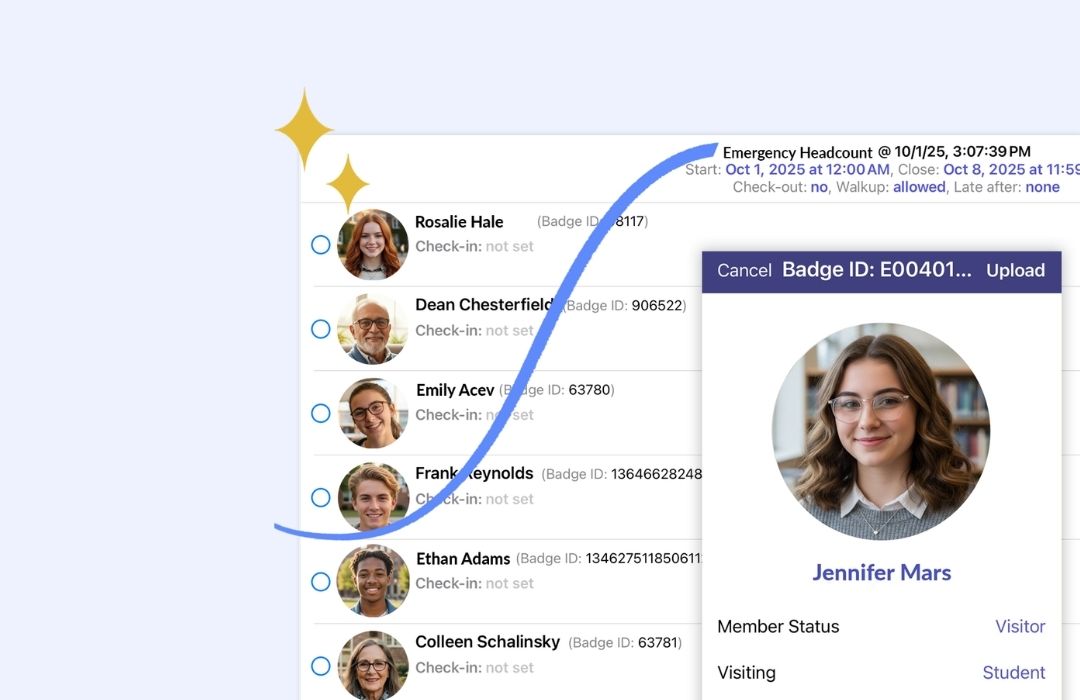
This is also where a tool like Stratus-io comes in. It replaces the manual headcount step with real-time, mobile check-ins, so staff can mark students safe from their phones and administrators get a live view of who is accounted for across the entire campus. AI can help you identify the gap. Closing it is what the right technology is for.
See How Stratus-io Works for Schools
Explore our dedicated page to see how Stratus-io can transform the way you run emergency and safety operations across your campus.

How Stratus-io Supports Your School
Stratus-io helps schools keep track of who’s on campus and respond to emergencies without the confusion of paper rosters or manual headcounts. It also supports everyday operations, making it easier for staff to stay organized both during a crisis and on a normal school day. Below are some ways Stratus-io helps make that possible.
Mobile Check-in
Staff can check students in and out from Android, iOS, or Windows devices, including Apple Wallet and Google Wallet, no extra hardware required
RFID Badge Reader Support
Many schools already have a badge or ID system in place and aren't looking to replace it. Stratus-io supports Prox, iClass, and other common badge types.
Real-time Emergency Headcount
Know exactly who is accounted for, and who isn't, during a lockdown, evacuation, or drill, without relying on a paper roster or a manual count.
Geofence
Track when students and staff enter or leave specific areas. This is especially useful for keeping tabs on multi-building layouts during an emergency.
SMS/MMS
Reach parents and staff instantly the moment an emergency happens. MMS support also makes it easy to send visual instructions, like a map or evacuation route.
Detailed Reporting
Access records of check-ins, attendance, and emergency headcounts, making it easier to review incidents, spot gaps in your plan, and have documentation ready for administrators.
Watch the video below to learn more about how Stratus-io supports your school’s emergency plans.

Cloud-in-Hand® Solutions Team
This blog reflects the expertise of the Cloud-in-Hand® Solutions Team, with over 100 years of combined experience in hardware, software, and firmware development. Since founding Solutions Consulting in 1992 — now known as Serialio LTD — the Solutions Team has designed and developed many innovative solutions. Cloud-in-Hand® Stratus-io Time and Attendance helps organizations like Apple, Google, Toshiba, LinkedIn, Salesforce, and many more.
Cloud-In-Hand® Solution Team
This blog reflects the expertise of the Cloud-in-Hand® Solutions Team, with over 100 years of combined experience in hardware, software, and firmware development. Since founding Solutions Consulting in 1992 — now known as Serialio LTD — the Solutions Team has designed and developed many innovative solutions. Cloud-in-Hand® Stratus-io Time and Attendance helps organizations like Apple, Google, Toshiba, LinkedIn, Salesforce, and many more.
Frequently Asked Questions
How is AI helping schools with emergency planning?
AI is helping schools with emergency planning by closing gaps that manual review often misses. According to a study, more than half of school districts are already using AI in their network environments to improve threat detection, communication, and overall safety planning across campus.
How does Stratus-io help schools enhance safety?
As AI is helping schools plan smarter, Stratus-io helps them execute faster. Its real-time check-in tools replace manual rosters and headcounts, while built-in SMS and MMS messaging sends instant alerts to parents and staff the moment an emergency occurs. If you’re interested in how Stratus-io works for schools, visit our dedicated page.
Does Stratus-io offer a free trial?
Yes, we offer a 30-day free trial of Stratus-io Time and Attendance Software. Schedule a demo by calling 512-994-3630 or fill out our contact form.
How much does Stratus-io cost?
Stratus-io pricing depends on your school’s specific needs. Contact our team for a custom quote tailored to your school.
Read More About Stratus-io
July 19, 2026
September 29, 2025